


The Custom Hero bot
The client has its own bot: it heals you, chooses the monsters, casts spells, throws runes, keeps your haste, eats and loots for you. It is part of the Custom Hero client and the rules allow it; external programs and bots stay forbidden.

How to start
-
1
Open the bot
Press Ctrl+Shift+B or the bot button in the panel of the custom buttons, below the Tibia buttons.
-
2
Choose a profile
Each character has its own profiles: create one with New profile, rename it in the field beside the list and delete it when there is more than one. Every change is saved at once.
-
3
Set the rules
Fill the tabs: Healing, Target (with the sub-tabs Target and Combat), Extras (with the sub-tabs Extras, Equipment and Autoloot) and, if you want, Hunting. Every rule has its own on/off switch. At the bottom of the Hunting tab, under each of its sub-tabs, the bot lists the errors that keep a healing, attack or use rule from ever going, each with Apply fix, and its Sequence sub-tab shows the order the bot really uses the rules in.
-
4
Turn it on
Use the switch at the top of the window, or press Pause at any time, even with the window closed.
On and off
Press Pause to turn the bot on or off at any time, even with its window closed. Change the key in Options > Controls > General Hotkeys ("Bot: Turn the bot on or off").
The switch is saved the moment you change it. If the client closes, crashes or your character dies, the bot is running again when you log in, without opening its window. Only you turn it off.
What the bot does, in order
While it is on, the bot checks your character five times per second, always in this order, and does at most what each step allows. Healing and combat also run the moment a cooldown ends, without waiting for the next check:
- Cure paralysis - when you are paralyzed: the cure spell of the Extras tab, or its haste spell when the cure is off or not ready (a haste ends the paralysis too).
- Healing - the healing spells whose rule holds; a potion at or below half of its percentage goes before the attacks, and above that it waits for an attack rune that needs the item interval at the same time.
- Combat - first the use rules that are due (Hunting, Use rules), then the first attack rule whose conditions hold; while it waits for its cooldown, a ready rule below fires only when it does not delay it.
- Target - attacks the monster chosen by your criterion.
- Haste - casts the haste spell again when it ends (in a protection zone only with the box of the Haste card).
- Food - eats at the interval you chose.
- Equipment - refills the quiver and the thrown weapon and puts on the weapon with charges, the ring and the amulet, as the cards of Extras > Equipment say.
- Automatic loot - collects everything from your corpses as soon as you pass next to them, except the items of your Autoloot list; it walks to corpses only with the automatic hunting on.
- Coins - with the automatic loot on, asks the server to change every 100 gold coins into 1 platinum coin and every 100 platinum coins into 1 crystal coin, also in the loot pouch and the store inbox; bound coins are never changed.
- Sale and deposit - the automatic sale with the merchant bell and the deposit with the banker's coffer, at the interval of their card.
- Automatic hunting - walks the route of the Hunting tab, while it is on.
The cooldowns come from the server: the bot never casts a spell that is still cooling down and waits 1 second between two items. A spell with a second cooldown group waits for both (Eternal Winter: attack 4 s and focus 40 s). While you walk paralyzed, runes and potions wait for your step, as the server does. Only monsters on your floor and in sight count.
Healing
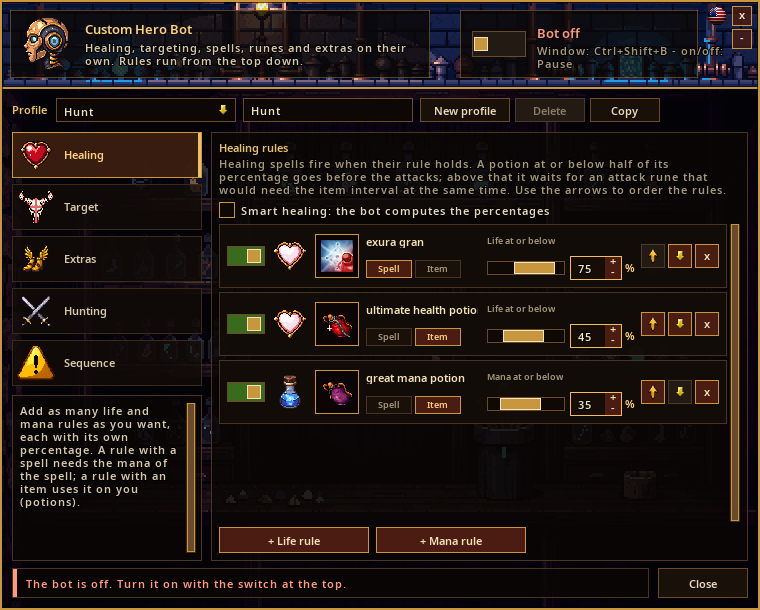
- Add as many rules as you want with + Life rule and + Mana rule.
- Each rule uses a spell or an item (a potion) and fires when your life or mana is at or below its percentage, from 1% to 100%.
- The rules are read from the top down and the first enabled rule that matches fires: put the strongest heal at the lowest percentage on top and order them with the arrows.
- A spell rule needs the mana of the spell; an item rule uses the item on you.
- A new profile starts with a life rule at 75% (choose its spell) and a mana rule at 75% with a mana potion, both off.
- Smart healing: with this box on, the bot computes the percentage of each rule from what its spell or potion restores (your current values) and from the life or mana you are losing, and adjusts it to what each use really restored. Off in a new profile.
Target
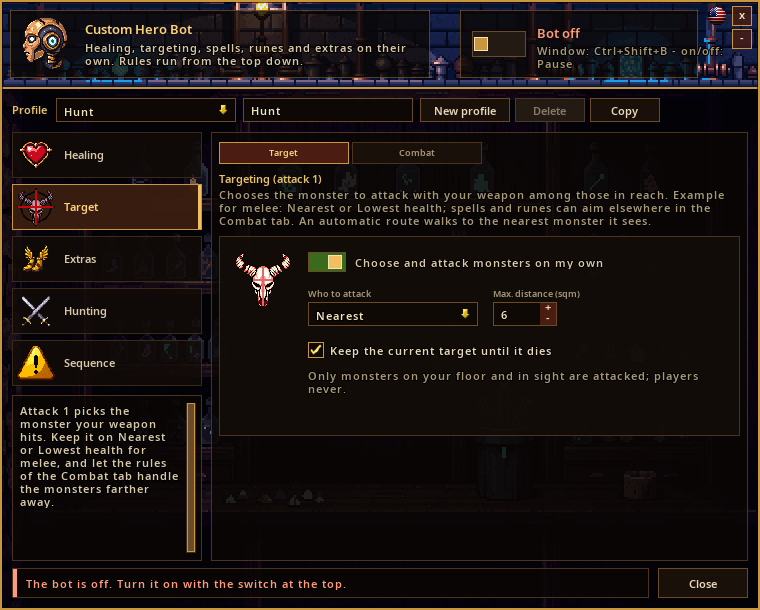
- Who to attack: Nearest, Farthest, Lowest health or Highest health.
- Max. distance: from 1 to 8 sqm (6 in a new profile).
- Keep the current target until it dies: on in a new profile. With it off, the bot may change the target, at most every 1.5 seconds.
- Only monsters on your floor and in sight are attacked; players never.
- For melee, Nearest or Lowest health work well; leave the monsters farther away to the rules of the next tab.
Combat
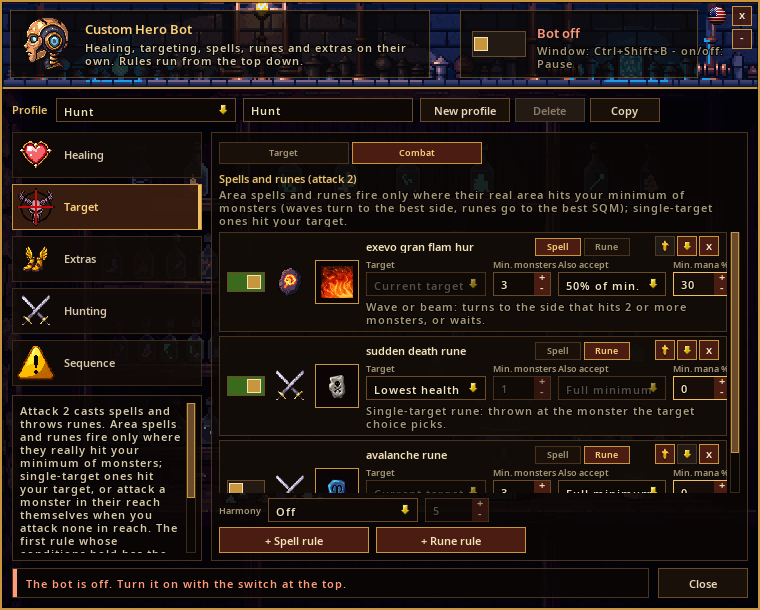
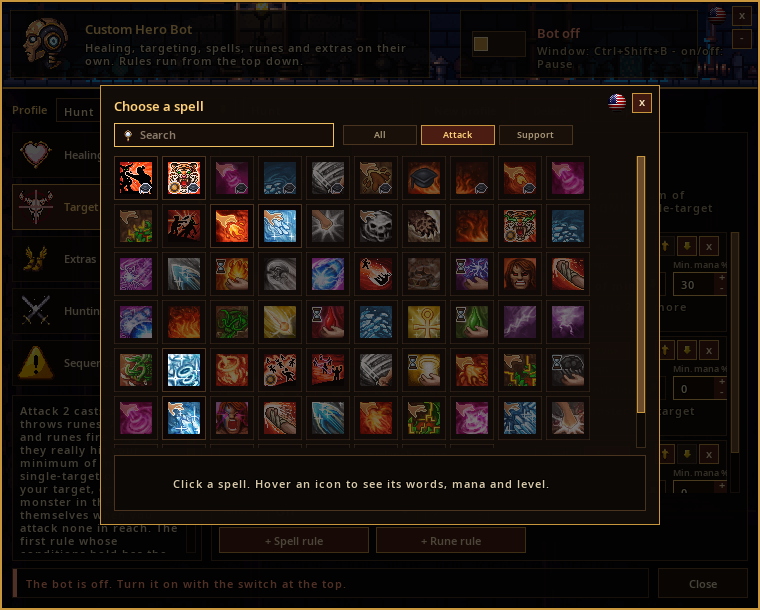
An area spell fires only where its real area hits at least the minimum of monsters (1 to 12); monsters that are only in range do not count. An area around you is checked where you stand; a wave or beam is checked on the four sides, and the bot turns to the side that hits enough and casts, or waits. A single-target spell (exori vis, exori frigo...) hits your target; when you attack no monster in its reach, the bot attacks one in reach by itself.
An area rune is thrown on the SQM in reach (7 sqm to the sides, 5 up and down, in sight) where its real area hits the most monsters, and only when that reaches the minimum. A single-target rune (sudden death...) is thrown at the monster the target choice picks: Current target, Nearest, Farthest, Lowest health or Highest health.
Optional, for area spells and runes: the rule may also fire when the area hits 25%, 50% or 75% of the minimum, rounded up. Minimum 3 with 50% = at least 2 monsters; without it, the minimum itself.
Every rule may wait until your mana is at least a percentage (0 to 100), so the healing always has mana left.
Put the strongest rule on top: the first one whose conditions hold has the turn. While it waits for its cooldown or for the exhaust of a potion, a ready rule below fires only when it does not delay it (in the long cooldown of a strong spell, for example); otherwise a rule below fires only when the conditions of the ones above do not hold (no rune left, not enough monsters or mana, no target in reach). When you are trapped, the area attack that hits every monster around you goes first, and a forced rule that waits for its cooldown no longer holds the others.
The bot follows the server: your power level (after a reset, the level that reset required, until your level passes it), your magic level and the spells you learned in the Spell Store. A rule that is waiting tells you why on the status line, and a rule the server refuses (for example "You do not have enough magic level.") waits 10 seconds while the other rules go first.
The card of a healing or attack rule with a Monk spell has its own harmony: Any harmony (the default), At least, At most or Exactly a harmony from 0 to 5, and, on the attack rules, Automatic, where the bot picks the harmony and the order of Builders and Spenders with the most damage per time. Each spell can wait for a different harmony; it holds back only Monk spells. The one harmony of the Combat tab is gone: a profile saved with it gets the same behaviour on each of its Monk spells. The server says which spell is a Builder or a Spender.
Extras
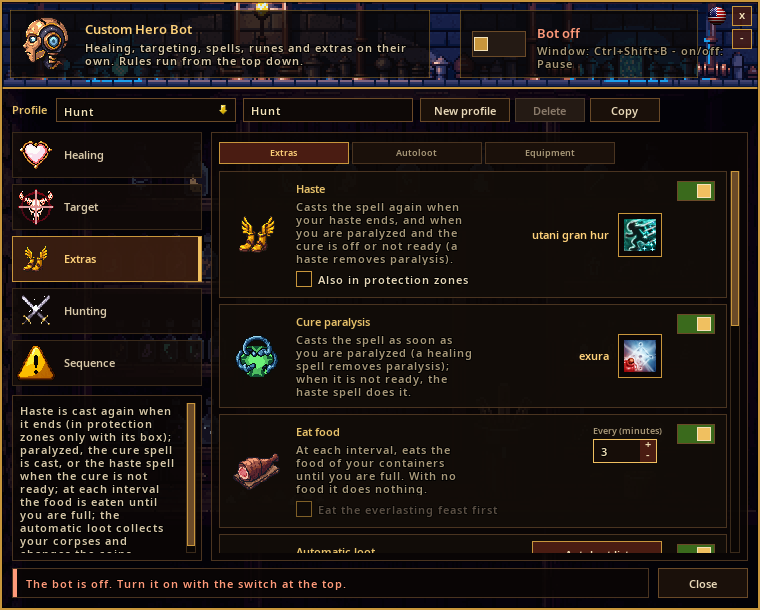
- Haste - casts the chosen spell again when your haste ends. While you are paralyzed it is cast only when the cure spell is off or not ready, since a haste ends the paralysis too. In a protection zone it is cast only with the box Also in protection zones checked (off in a new profile).
- Cure paralysis - casts the chosen spell as soon as you are paralyzed, for example a healing spell such as Light Healing, which ends the paralysis. After each haste or cure the bot waits 0.7 second for your new state before casting another one.
- Food - eats every 1 to 30 minutes (3 in a new profile). With Eat the everlasting feast first (on by default), it eats the everlasting feast of the Store before the other foods while you have it. The server sends no hunger signal, so the bot eats by time; when you are full the server answers "You are full."
- Equipment - each card keeps one kind of item in use and takes it from your backpacks, also from closed ones. Refill ammunition: when the quiver holds fewer arrows or bolts of your weapon than Refill below (1 to 1,000, 20 in a new profile), it is filled up with ammunition of your level (quiver in the right hand, bow or crossbow in the left). Thrown weapon: keeps a stack in a hand, refilled below the number you set. Weapon with charges: puts the ice rapier or another weapon that breaks with its last charge in an empty hand. Ring and Amulet: without rules, put on when the slot is empty. With rules (life or mana at or below or at or above a percentage, monsters within a distance of 1 to 7 sqm, attacking a target), the first rule that holds and whose item is in your backpacks chooses the item: the bot puts it on, swaps it for the item of another rule that holds and takes it off when no rule holds. An item that is not in your rules is never touched, and the other cards never swap an occupied slot.
- Automatic loot - collects everything from the corpses that still have loot for you, the reward corpses of bosses included, as soon as you pass next to them (the corpses under other corpses too), into the container of its item rule, your loot containers (or your main backpack, without one or when they are full), except the items of the Autoloot list (the Skipped list of the Quick Loot), with 0.2 second between uses. It also asks the server to change every 100 gold coins into 1 platinum coin and every 100 platinum coins into 1 crystal coin, also in the loot pouch and the store inbox; bound coins are never changed. Without the automatic hunting the bot never walks to a corpse; with it, it loots as the goal of the route says (Hunting tab, Fight).
- Autoloot - search a monster to see its loot, or search an item, and click an item to switch it between collected and not collected; the items at the bottom are not collected.
- Automatic sale and deposit - with the merchant bell, sells everything The Lootmonger buys from you, as its window does (your equipped items and your Never sell list stay). Then, with the banker's coffer, deposits all your gold in the bank, the loot pouch and the store inbox included. It runs as soon as you turn it on and then every 15 to 45 minutes (30 in a new profile), always the sale first. Without these Store items the card cannot be turned on.
Automatic hunting
The Hunting tab walks a route, stops to fight when enough monsters gather, loots as the goal of the route says and leaves the hunt when your supplies end or a value of the Leaving tab is reached. A route is made of points that you mark, or is Automatic in the instance: inside a Hunting Grounds room the bot reads the map of the room from the server, walks to the monsters it sees and to the spawn points it has not seen empty for the respawn time of the server, and goes down the hunt floors by itself. It uses the rules of the other tabs to heal and attack, and it only runs while the bot is on. The bot panel shows EXP/h and loot/h after the first minute.
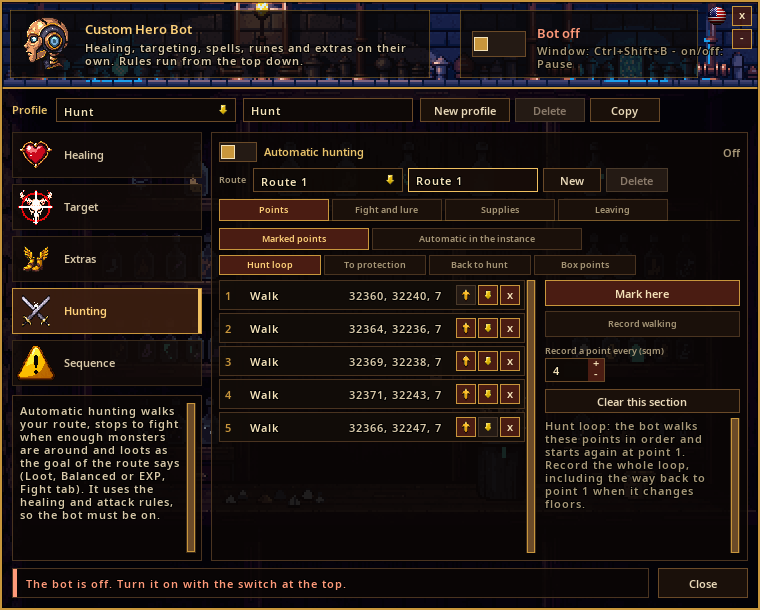
Mark here adds the sqm where you stand, with its floor. Record walking adds a point every 1 to 10 sqm while you walk, and one at every floor change, remembering how you changed floor: stairs, hole or ramp, ladder, or an item used on the map such as a rope or a shovel.
A route has three sections: the hunt loop, the way to the protection point and the way back to the hunt. Points can be moved up and down, deleted or cleared; inside the Hunting Grounds they are saved relative to the room, so a route works in every room of that scenery.
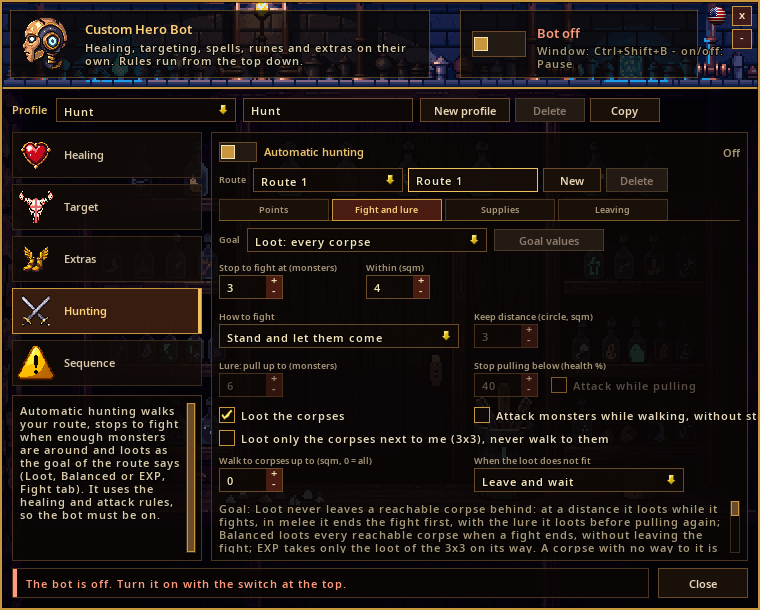
The bot stops to fight when at least the chosen number of monsters (1 to 12) is within 2 to 7 sqm. Fewer monsters are ignored and the bot keeps walking; a monster that blocks the way is attacked; on an automatic route the fight goes on while a monster is within 7 sqm. Stand: the bot waits and your area rules hit the monsters around you. Circle: the bot keeps moving around them at the distance you set, away from corners with 2 exits or fewer. Normal lure: the bot pulls the monsters, waiting up to 8 seconds for the ones left behind ("The pack did not come: the route goes on."), until it has the number to pull, then fights moving around them. Box lure (point routes only): the same, but it fights standing at the nearest box point. While hunting, the chase mode stays off so the bot decides where you stand; your own chase mode comes back when the hunt or the bot is turned off.
Goal of the route: Loot walks to every corpse and never leaves one behind, also while it fights at a distance; Balanced loots every reachable corpse at the end of each fight and never leaves a fight to loot; EXP takes only the loot of the 3x3 on its way. The loot distance (0 in a new route = every corpse of the floor, up to 8 sqm) limits the corpses the bot walks to, never going back for the others. The goal fills the loot fields; change any of them and the route is adjusted, and Goal values puts the values of the goal back. When the loot does not fit, Loot leaves and waits; Balanced and EXP keep killing without looting. Loot only the corpses next to me (3x3) never walks to a corpse.
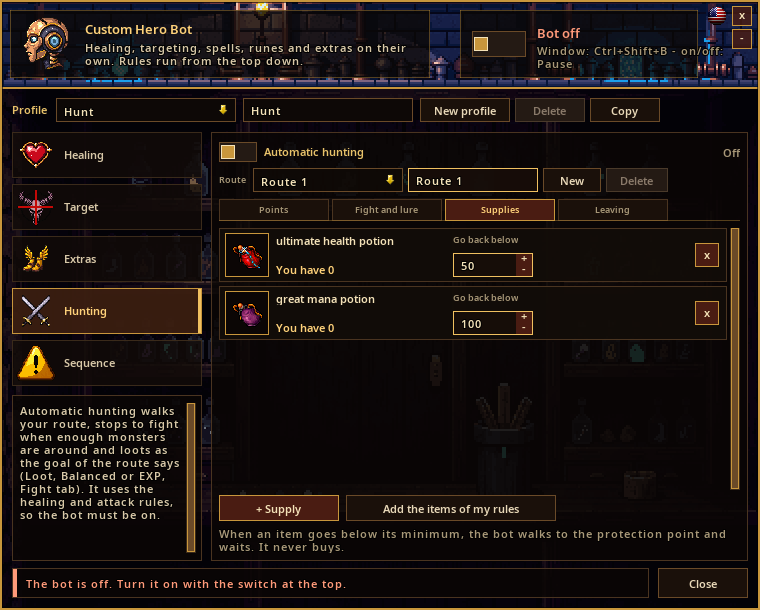
The Leaving tab: the bot leaves the hunt when a supply goes below its minimum (Supplies) or when the free capacity, the hunt time or the stamina reaches the value you set (0 turns a value off). On a point route, with Sell the loot to The Lootmonger at the protection point (on in a new route), it sells there the items of your loot containers to The Lootmonger, who must stand within 4 sqm, and then waits. On an automatic route it goes up to the arrival room and waits there, since the instance has no NPC to sell to; with Go back to the hunt it goes down again once none of these conditions holds.
You can also leave with the button on the top right of the game screen, also with the bot window closed, on automatic and point routes: Leave while farming (the bot fights and loots on its way to the protection point), then Focus on leaving (no loot and no fight, only the way out), then Cancel leaving. The button is hidden in protection zones and while the bot is paused; after leaving by the button, the hunt starts again only when you turn it off and on.
Each supply is an item with a minimum (Add the items of my rules fills the potions and runes of your rules). When one goes below its minimum, the bot walks to the protection point and waits there. It never buys anything. With Go back to the hunt after I refill on, it goes back by itself once you have refilled.
Optional, none in a new profile: every N uses of a spell or item, use another spell or item; you choose N (1 to 99, 2 when you add a rule) and both actions, and you can add as many rules as you want, each with its switch. Only the uses by the bot count, by any of its rules. When the action is due, it goes in the turn of the attacks, before the attack rules, as soon as it can: an attack spell or rune as its attack rule says (or with the values of a new rule), any other spell or item on you.
The Sequence sub-tab shows the order the bot really uses your rules in: the healing spells, the potions at or below half of their percentage (life, then mana), the attacks (first the use rules that are due, then the area rules, then the single-target ones) and then the other potions. These steps go in the same pass; inside a step, a rule goes only when the ones above it cannot.
At the bottom of every sub-tab of Hunting, the bot lists the errors that keep one of your healing, attack or use rules from ever going (for example a rule above that always takes its turn, or a use rule whose counted action no rule uses), each with its Apply fix button. With none, it says that your rules work together as they are.
Loot 3x3
- Alt+Q (you can change it in the hotkeys) loots every corpse of the 9 sqm around and under you, stacked ones too, up to 30 corpses, with your loot list.
- You can press it while walking: a step does not cancel it. There is 0.2 second between two uses; a press during the wait is sent when it ends.
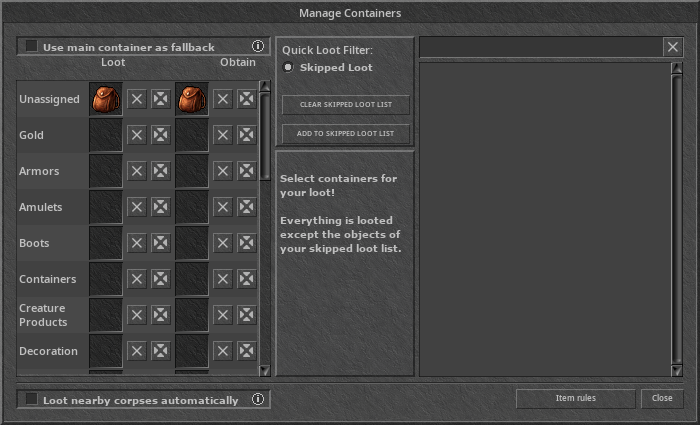
- Loot nearby corpses automatically: with this option on, the client collects when you get close, without a message when there is nothing to take.
- Only corpses you may open are looted: without owner, yours, your party ones and the reward corpses of bosses.
- Boss reward corpses: the loot key, the automatic loot and the bot loot them too. Each participant sees the loot mark while their own reward in that corpse has items, and takes only their own reward.
- In a party, a corpse loses its loot mark only for the member who has nothing of their own loot list left in it; the others keep the mark while something of their list is there.
- An item with an item rule (Quick Loot, Item rules) goes first to the container of its rule, the loot pouch in the store inbox included; when that container is full, and for every item without a rule, the loot goes to the loot container of its category. Without a loot container, or when your loot containers are full, the loot goes to your main backpack. Everything is collected except the items of your skipped list; only a full main backpack or no capacity leaves an item in the corpse.
- A corpse that the automatic loot cannot loot (full backpack or no capacity) is tried at most 5 times and then left; the loot key still works on it.
- There is no loot when killing (auto loot is off): use Alt+Q or the automatic option.
- While your stamina is paused, kills give no loot, so there is nothing to collect. Stamina
- Coins: gold, platinum and crystal coins are exchanged with a normal use (click or "Use"), without the crosshair.
Only the bot that comes with the Custom Hero client is allowed. Programs, bots and clients from outside remain forbidden by the server rules.

Players Online
-
1
Zum Level 31,161 Current Level 3,861 Resets 14 · VIP
-
2
Cursed Level 18,465 Current Level 2,965 Resets 11 · Legend
-
3
Albedo Level 8,767 Current Level 1,367 Resets 8 · Mythic
-
4
Bidoga Level 85 Current Level 85 Resets 0 · Novice
-
5
Blessed Level 58 Current Level 58 Resets 0 · Novice
-
6
-
7
-
8
-
9
Haunted Level 1 Current Level 1 Resets 0 · Novice
-
10